ICT PRO v6.4 · LIVE ON TRADINGVIEW

One Good Trade Pays for the Month. One Bad Trade Wipes the Account.

Consider this an investment in protecting your capital. Choose the plan that fits your trading style and start trading like a professional today.

NSE session-aware Crypto & Forex ready Cancel anytime
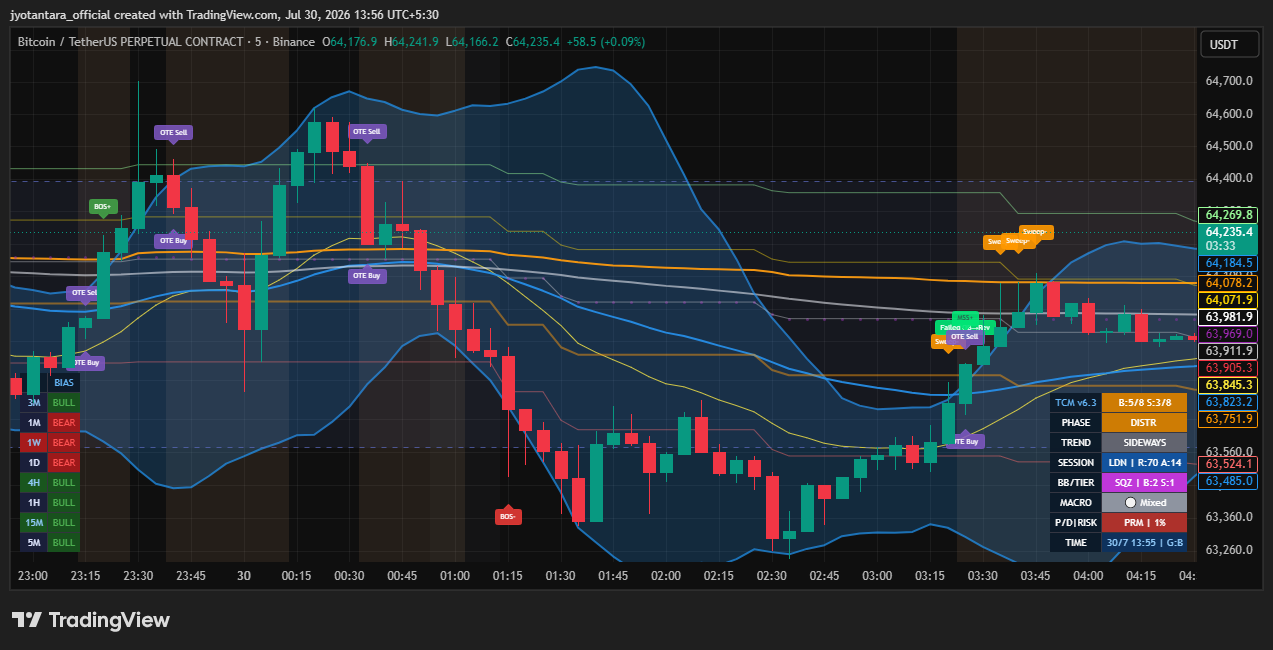
BTCUSDT · ICT Pro v6.4
ICT Pro v6.4 indicator showing BOS, Sweep, OTE Buy/Sell zones and the 8-timeframe bias panel live on a BTCUSDT chart
MSS+ Confirmed Reversal
OTE 4/8 Bias Aligned
THE BUNDLE

Two tools. One subscription.

ICT Pro reads the chart for you. TradeCalc Master turns that read into a sized, risk-checked trade — logged automatically.

Pine Script Indicator · TradingView

ICT Pro v6.4

A full ICT / Smart-Money-Concepts engine, built in Pine Script v6, that reads market structure the way an institutional desk would — and plots it live on any TradingView chart, decluttered and colour-coded so a screen full of signals never feels overwhelming.

  • BOS, CHoCH & confirmed MSS structure labels, auto-drawn on every swing
  • Auto-mitigating Fair Value Gap boxes that delete themselves once filled
  • Order Blocks, Breaker Blocks, EQH/EQL liquidity pools & OTE Fibonacci zones
  • 8-timeframe Bull/Bear bias panel + London/NY/Asia kill-zone & session tracker
  • Built-in BB/Keltner squeeze detector, RSI divergence & liquidity sweep alerts
  • Works on Stocks, F&O, Crypto Futures/Spot, Forex & MCX Commodities
Web Dashboard

TradeCalc Master

The companion app where you size the position, track the outcome, and review your edge over time — built for the way ICT traders actually work.

  • Smart risk & position-size calculator
  • Auto-synced trading journal
  • Performance dashboard by setup type
  • Per-account, per-symbol settings
SIGNAL REFERENCE

Every box, every colour, decoded.

The exact legend used by the indicator — so a chart full of tags never feels like a foreign language.

LIVE LEGEND 14 concepts · colour-matched to the indicator
BOSBreak of Structure

Price closes beyond the last swing point — the trend is continuing.

CHoCHChange of Character

First break against the trend — the earliest warning it may be turning.

MSSMarket Structure Shift

CHoCH confirmed — the higher-timeframe trend has now actually flipped.

OBOrder Block

Last opposing candle before a strong move — marked as Demand / Supply Zone.

FVGFair Value Gap

A 3-candle price imbalance. Box auto-deletes the moment price fills it back.

BrkBreaker Block

A failed order block that flips into fresh support or resistance.

OTEOptimal Trade Entry

The 62%–79% Fibonacci retracement pocket — where entries carry the best odds.

SweepLiquidity Sweep

Resting stop-losses are grabbed just before the real move begins.

EQH / EQLEqual Highs / Lows

A pool of resting liquidity sitting above/below a repeated price level.

PO3Power of Three

The session cycle: Accumulate → Manipulate → Distribute.

SQZSqueeze Break

Bollinger/Keltner volatility contraction just released — expansion incoming.

Pin / EngPin Bar / Engulfing

Classic single- and two-candle reversal patterns, shown at swing points.

RSI DivRSI Divergence

Momentum disagrees with price — a possible sign the move is running out of steam.

B : S8TF Bias Panel

How many of the 8 timeframes are structurally Bull vs Bear, at a glance.
WORKFLOW

How to actually trade the chart

The order these four steps happen in matters — this is the sequence the indicator is built around.

STEP 01

Check the Bias Panel

Look at the 8-timeframe table first. Only take trades in the direction most timeframes agree on.

STEP 02

Confirm Structure

Wait for a BOS in your bias direction, or a CHoCH → MSS pair if you're trading a reversal.

STEP 03

Find Confluence

Best entries sit where an OTE zone overlaps an FVG or Order Block — not any single signal alone.

STEP 04

Size & Log It

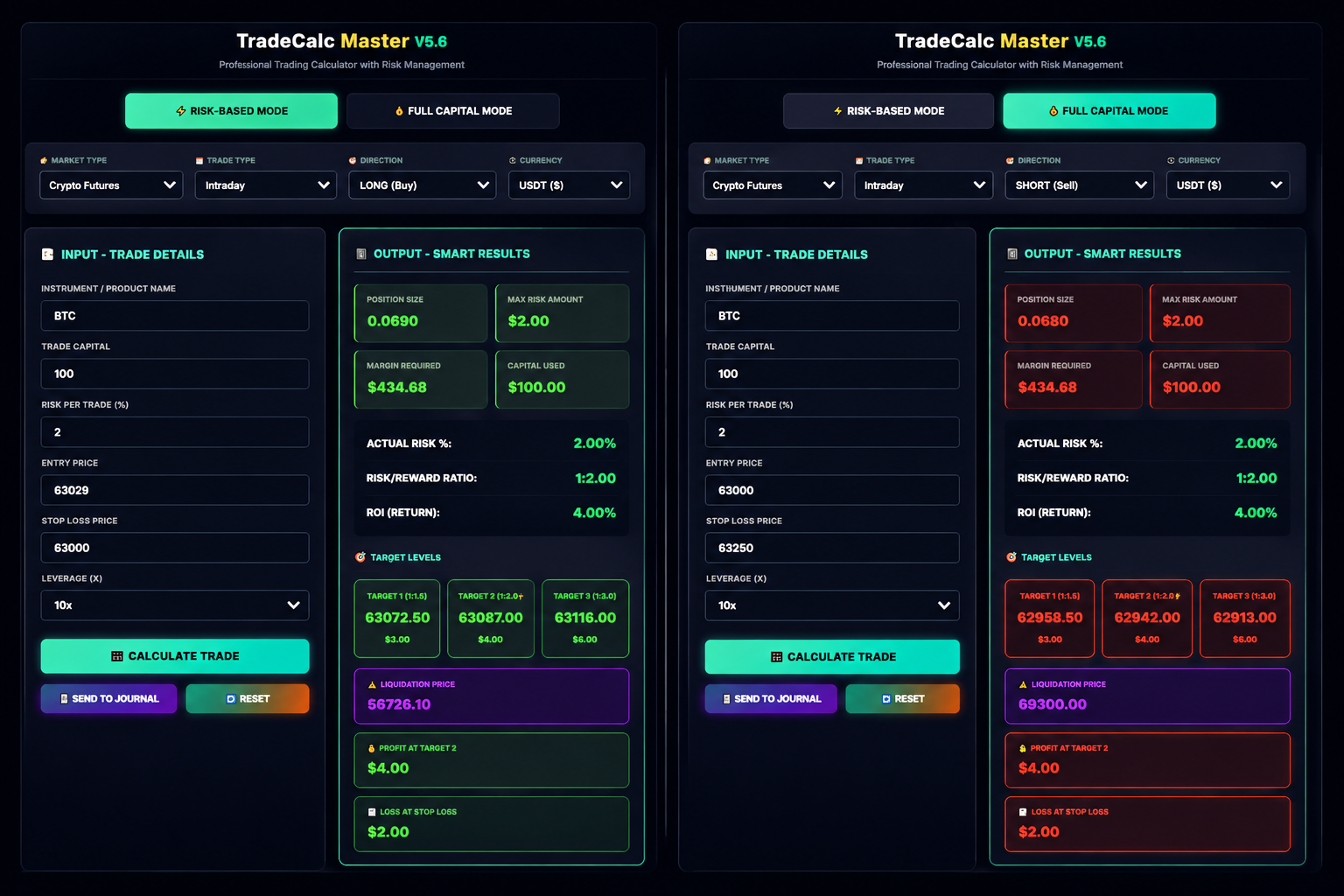
Feed your entry and stop into TradeCalc Master — it sizes the position and journals the trade for you.

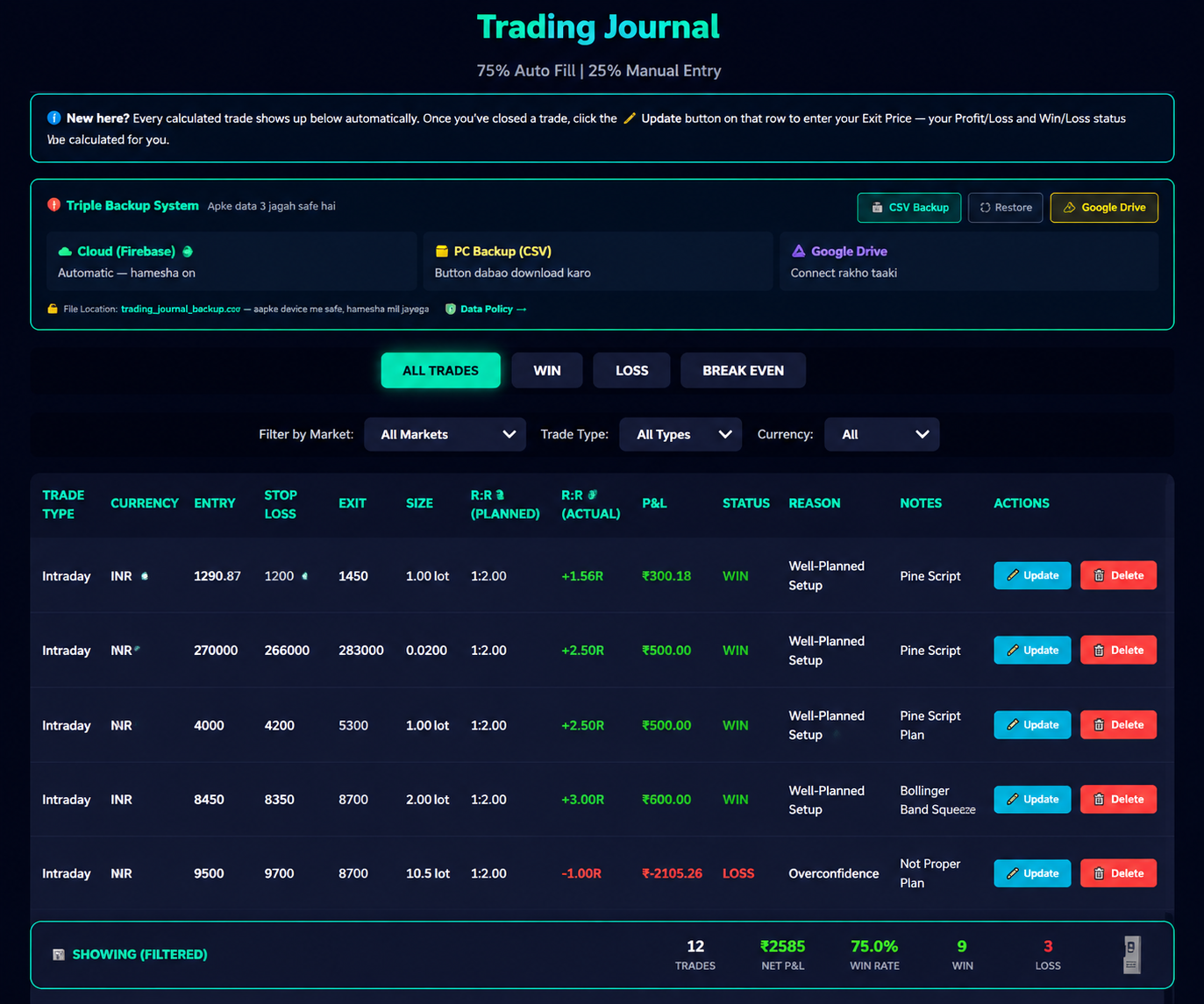
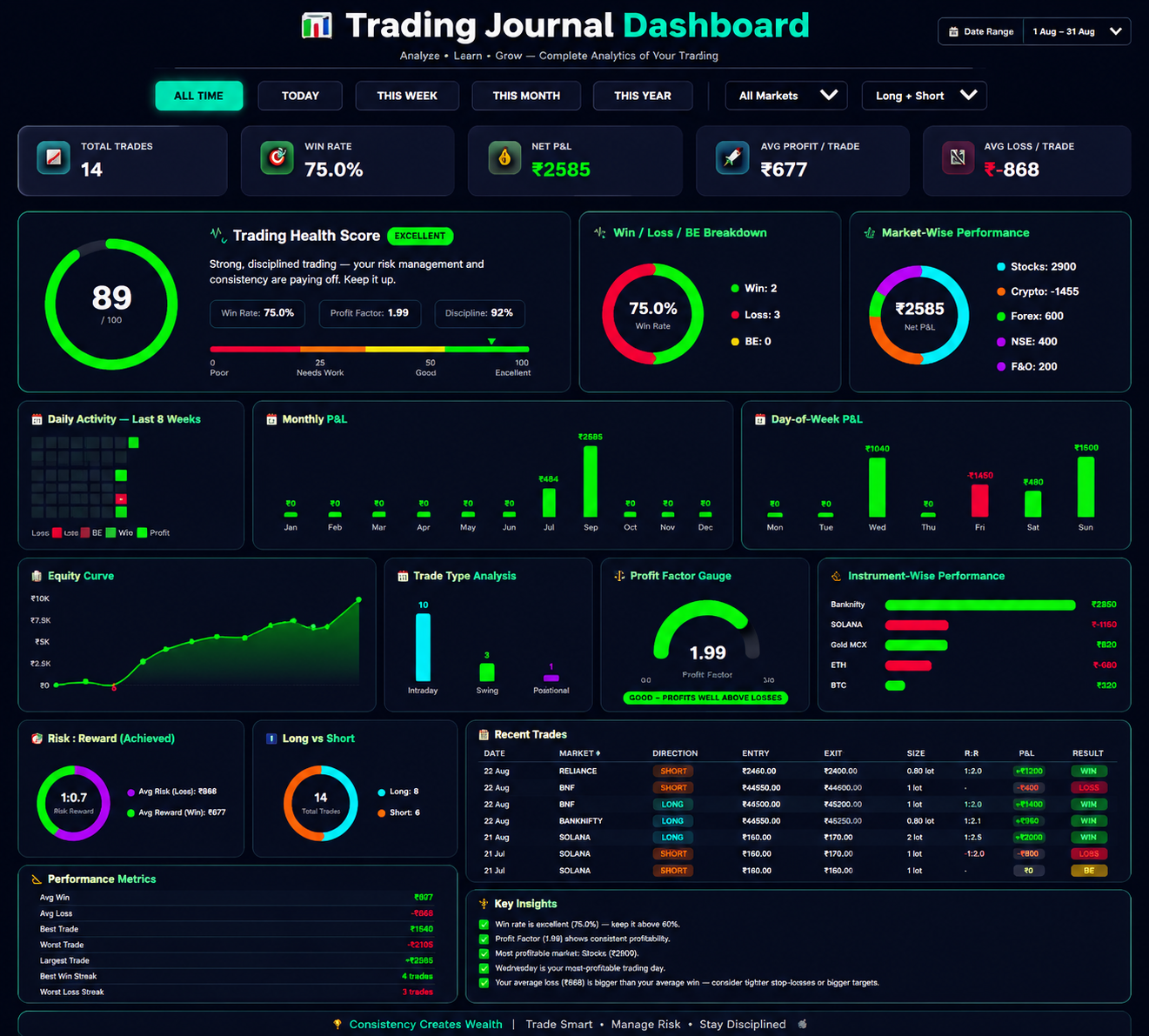
TradeCalc Master dashboard showing Smart Calculator, Trading Journal and performance stats
THE DASHBOARD

Everything past the chart, in one place.

Once ICT Pro flags a setup, TradeCalc Master takes over — sizing, logging and reviewing every trade so your edge is measurable, not just a feeling.

Smart Calculator

Enter entry, SL and account risk % — get exact quantity and R multiple instantly.

Trading Journal

Every sized trade auto-logs with its setup tag — BOS, OTE, FVG — for later review.

Performance Dashboard

See win rate, average R and drawdown broken down by which ICT concept you traded.

Per-Symbol Settings

Save risk defaults per account and instrument — Nifty futures, BTC, or your equity cash book.

PRICING

Simple plans, priced for Indian traders

Every plan includes the ICT Pro v6.4 indicator + TradeCalc Master dashboard. Upgrade or cancel anytime.

Switch to Yearly below and save up to 48% — pay less than half, month for month.

Web Dashboard

TradeCalc Master

Smart calculator, auto trading journal & performance dashboard — on its own.

₹399/ month

Billed monthly, cancel anytime

2.5 months free

  • Smart Risk & Position-Size Calculator
  • Unlimited Auto Trading Journal
  • Full Performance Dashboard & equity curve
  • Stocks, F&O, Crypto, Forex & MCX supported
  • Email support
Start Free Trial
Pine Script Indicator

ICT Pine Script

The ICT Pro v6.4 indicator on its own, for your TradingView chart.

₹499/ month

Billed monthly, cancel anytime

2 months free

  • BOS, CHoCH & MSS structure auto-plotted
  • FVG, Order Blocks, Breaker Blocks & OTE zones
  • 8-Timeframe Bias Panel + Kill-Zone tracker
  • Squeeze, RSI-Divergence & Liquidity-Sweep alerts
  • TradingView invite within 24 hrs
Start Free Trial

TradeCalc Master and ICT Pro are technical charting and analytical tools intended for educational purposes. They plot market structure and do not constitute investment advice, a research report, or a buy/sell recommendation. Trading in securities and derivatives is subject to market risk — please read all scheme-related documents carefully and consult a SEBI-registered investment adviser before making trading decisions.

QUESTIONS

Frequently asked

Does this place trades for me?

No. ICT Pro plots structure and zones on your chart, and TradeCalc Master helps you size a position — but every trade is placed by you, in your own broker terminal.

Which markets does it work on?

Any symbol on TradingView — NSE equities and index F&O with session-aware kill zones, plus crypto and forex pairs with their own session logic.

Can I switch between monthly and yearly?

Yes, anytime from your account settings. Switching to yearly applies the discount from your next billing cycle.

Is there a free trial?

Every plan includes a 3-day free trial with full access — no card charged until the trial ends.

Do you offer refunds?

Yes — write to support within 7 days of your first charge if the tool isn't a fit, and we'll process a full refund.

Stop guessing where structure breaks.

Start your free 3-day trial — full access to ICT Pro v6.4 and the TradeCalc Master dashboard, no card required upfront.

Start Free Trial